
How to set up a Google Business Profile in Australia
A Google Business Profile is free, and setting one up takes about an hour plus a wait for verification. Go to business.google.com/add, enter your business name and category, answer the address question, list the areas you serve, add your phone and website, and verify. The seven steps are below, with the decision that matters most for a trade: whether to show your address.
Seven steps, in the order Google asks them
Start at business.google.com/add
Sign in with the Google account you want the profile to live under, ideally a business address and not a personal Gmail. Search for your business name first. If a profile already exists, claim it; a second one creates a duplicate you will have to remove later.
Enter the name on your ute
Use your real trading name, exactly as it appears on your signage, invoices and website. Google's rules bar adding suburbs or services to the name, so "Smith Plumbing", not "Smith Plumbing Sydney Emergency Plumber". Padding the name breaks those rules.
Choose your primary category
The category tells Google which searches you belong in. Pick the most specific one that fits your main work: "Plasterer", not "Contractor". You can add secondary categories after setup. Google's advice is to use as few as describe the core business.
Answer the address question
Google asks whether customers can visit your location. If they come to your workshop or office, say yes and enter the address. If you go to them, say no. The address is then kept off the profile. This is the decision covered in the next section.
List your service areas
Add the suburbs, council areas or postcodes you work in. Google allows up to 20, and says the whole area should sit within about two hours' drive of your base. Name real places you take work in. A long list of suburbs you never visit helps nobody.
Add your phone, website and hours
Use the same phone number and business name that appear on your website, written the same way. Set the hours you answer the phone, not the hours you are on site. If you have no website yet, leave it blank and add it later.
Verify
Google offers whichever methods suit your business: usually a video recording, sometimes a phone or email code, a live video call or a postcard. Reviews of a verification take up to five business days. Avoid editing the name, address or category while you wait.
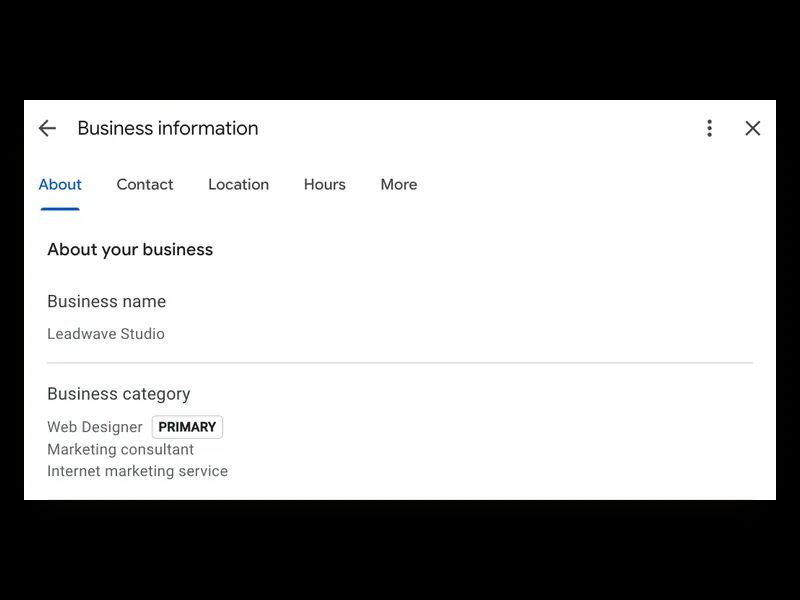
What the name and category look like when they are right
The panel in the picture is our own profile. The name is the trading name and nothing else. The primary category is the most specific one that fits the main work, Web Designer, with two secondary categories for the rest of what we do.
That is all those two fields need. The name matches the website and the invoices, and the category tells Google which searches the business belongs in.
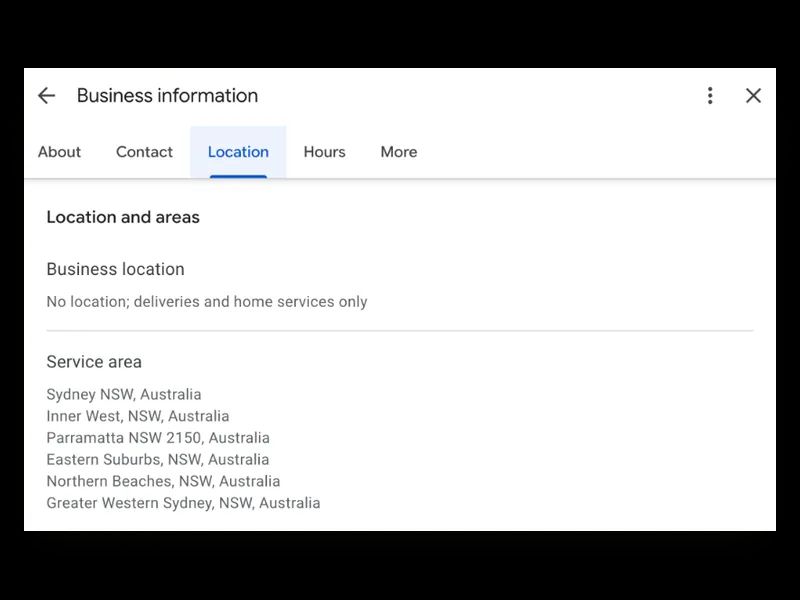
Show your address only if customers come to it
Google's rule is short. If you do not serve customers at your business address, the address comes off the profile and you list service areas. If customers do visit, you show it. A business that does both, such as a workshop that also does call-outs, can show the address and list service areas as well.
For most trades that settles it. A plumber working from home has no customers at the door, so the home address is hidden. Showing it to get a pin on the map breaks the rule. It also puts your home on Google Maps.
We made the same call on our own profile, and the panel pictured is its Location tab. Leadwave works from a shared office that clients do not visit, so the business location is left empty and the profile lists six service areas across Sydney, from the Inner West to the Northern Beaches.
Hiding the address changes how a profile competes in local results. What that means for a trade, and what to do about it, is in local SEO for tradies.
What to film when you have no shopfront
Video is the method Google recommends when it is offered. The video has to show three things: where the business is, that it operates, and that you run it.
With no shopfront, show the street sign and the outside of the place you work from. Then your ute with its signage, your tools, and branded items such as uniforms or invoices. Finish by unlocking the vehicle or the workshop, or opening your business paperwork, to show it is yours. Film it in one go.
If the first attempt is refused, record it again more slowly and show more. A profile that is live but not appearing has a different set of causes, covered in why a Google Maps listing does not show up.
Four fields to fill in the same week
The description
You get 750 characters. Open with your trade and where you work: "Licensed electrician serving Drummoyne, Five Dock and Concord." Then your main services in plain words, one reason customers choose you, and how to book. Google's rules bar links, prices and sales offers here.
Services
Add each service you want to be found for as its own entry, with a line describing it. These mirror the service pages on your website. If the two lists disagree, fix whichever one is wrong.
Photos
Upload your logo, then real photos: finished jobs, before and after, the vehicle, the people. Phone photos are fine. Stock images tell a customer nothing about your work.
Your review link
In the profile, choose "Ask for reviews" and copy the link. Put it on your invoices and in your email signature, and reply to every review you get.
Or hand the profile to us
A Google Business Profile is free and you can do everything above yourself. If you would sooner hand it over, setting up and managing the profile is part of every Leadwave plan, alongside the website it points to.
Google Maps visibility usually moves in 4 to 8 weeks, organic rankings take 3 to 6 months, and no one can guarantee either. Prices are on the pricing page.
Google Business Profile setup questions, answered
Is Google Business Profile free?
Yes. Google charges nothing to create, verify or manage a Business Profile. The only costs are your time and, if you hire someone to do it, their fee. Be wary of calls claiming to be from Google that ask for payment to keep your listing.
How long does it take to set up a Google Business Profile?
Filling in the profile takes about an hour if you have your details and a few photos ready. Verification is the wait: Google says its review takes up to five business days after you submit a video or code. A postcard, where that is the method, can take around two weeks.
Should I hide my address on Google Business Profile?
Hide it if customers never come to you, which covers most trades working from home or a ute. Google's rules require it, and you list service areas in its place. Show the address only if customers visit your premises during the hours you state on the profile.
How many service areas can I add?
Up to 20. They can be suburbs, council areas or postcodes, and Google says the whole area should fall within about two hours' drive of where the business is based. Choose the places you really take work in; a tighter, accurate list serves you better than a padded one.
What should I write in my Google Business Profile description?
Say what you do and where in the first sentence, then your main services, one specific reason to choose you, and how to get in touch. You have 750 characters. Write it for a customer reading on a phone, and leave out links, prices and offers, which Google does not allow there.
Rather see it than read about it?
Tell us about your business and we'll build your homepage — a real working page, not a sketch. Back to you within 2 business days of getting your details. No cost, no obligation. It's a preview: the page stays with us unless you go ahead.