
Google Maps Listing Not Showing Up? 7 Fixes (2026 Update)
A Google Maps listing goes missing for one of two reasons. Either Google is not showing it at all, because it is unverified, suspended or a duplicate. Or it is showing it too far down to be seen, because of category, distance, reviews or thin details. Seven checks follow, in the order to run them.
Quick self-check
Run through these first — they catch the most common reasons a listing goes missing.
Is your listing verified?
Check your verification status at business.google.com before anything else.
Is your category correct?
Your primary category determines which searches you can appear for.
Is your NAP consistent?
Name, address and phone must match exactly across your GBP, website and directories.
Your Google Maps Visibility Questions Answered
How long after fixing these issues will I start appearing?
A profile that was unverified or suspended comes back once Google approves it. Moving up the results is slower. Google Maps visibility usually moves in 4 to 8 weeks after the fixes, and competitive suburbs sit at the longer end. No one can guarantee a position.
My Google Business Profile is suspended. What do I do?
A suspended profile is hidden from the public and you cannot edit it. Fix whatever broke Google's guidelines, then lodge an appeal through Google's appeals tool with evidence such as a licence or utility bill. Once the evidence form is open you have 60 minutes to submit it. Do not create a new profile while you wait.
What is NAP and why does it matter?
NAP stands for name, address and phone. Google checks whether the details on your profile match your website and other listings. Write them the same way everywhere, down to "Pty Ltd" and the phone format. Google says businesses with complete and accurate information are more likely to show in local results.
I have a duplicate listing. What do I do?
First check whether you manage both. If you do, keep the verified one with the reviews and remove the other from your account. If the duplicate is not yours, open it in Google Maps, choose "Suggest an edit" and report it as a duplicate of your real listing.
I don't have a fixed address. Can I still show on Google Maps?
Yes. A service-area business hides its address and lists up to 20 suburbs or areas it works in. You will not get a pin on the map, and Google still weighs how far the searcher is from you, so listing a suburb does not mean you will show there.
7 reasons your Google Maps listing isn't showing up
Your listing isn't verified
Google says verifying a business makes it more likely to appear. Check the status at the top of your profile and finish the process if it says pending. Google recommends video where it is offered.
Your profile is incomplete
Google matches profiles to searches on the detail you give it. Fill in category, services, hours, service areas and description. In its words, complete and accurate profiles are more likely to show in local results.
You're too far from the searcher
Distance is one of Google's three local ranking factors, with relevance and prominence. You cannot move the searcher, so the work goes into the other two.
You have no recent reviews
Review count and rating feed what Google calls prominence. It says more reviews and positive ratings can help local ranking. Ask after every job and reply to each one.
You've chosen the wrong category
Your GBP category determines what searches you appear for. 'Electrician' ranks for electrical searches. 'Contractor' doesn't.
Your profile is suspended
A suspended profile disappears from Maps completely, and you cannot edit it until it is reinstated. Common triggers are a padded business name or an address customers cannot visit. See the question above for the appeal.
Inconsistent NAP across the web
If your business name, address or phone differs between your GBP, website and directories, Google loses confidence in your listing.
How to verify your Google Business Profile
Verification is the single biggest blocker to appearing in Maps — here's how to check and fix it.
Go to business.google.com
Sign in with the Google account that manages your listing.
Check your verification status
Your dashboard will show Verified, Pending or Needs verification at the top.
Complete verification if pending
Choose phone, email, video or postcard verification depending on what Google offers your business.
Confirm your details match everywhere
Once verified, double-check your name, address and phone match your website and directory listings exactly.
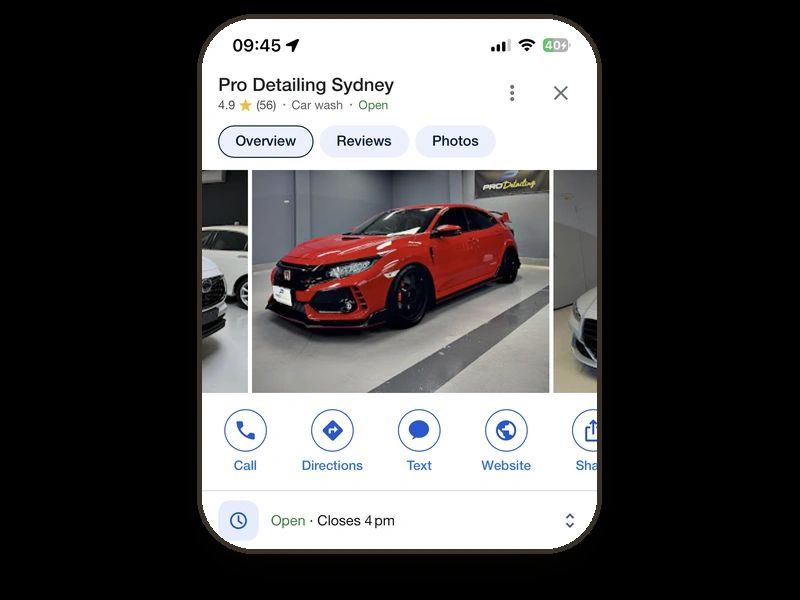
What a healthy profile looks like
The profile in the picture is Pro Detailing Sydney's. It carries 4.9 stars from 56 Google reviews, and it appears on page one for local searches like "car detailing Five Dock". None of that is a trick. It is the checks above, done and kept up.
If your profile is new, start with how to set up a Google Business Profile. If you work from home or a ute and hide your address, the rules are different, and local SEO for tradies covers them.
We handle Google Business Profile setup and ongoing management as part of every Leadwave build. Citation consistency and monthly reporting come with Growth Plus. Google Maps visibility usually moves in 4 to 8 weeks. Organic rankings take 3 to 6 months. No one can guarantee either.
Rather see it than read about it?
Tell us about your business and we'll build your homepage — a real working page, not a sketch. Back to you within 2 business days of getting your details. No cost, no obligation. It's a preview: the page stays with us unless you go ahead.